This server hosts a ADC v1 HTTP compliant data repository and software for handling access control. The tools and services were developed within the scope of the iReceptor Plus project promoting human immunological data storage, integration and controlled sharing.
Service
[top]
The software running the repository is iReceptor Turnkey. It is is available from https://gateway.ireceptor.org/
or directly by accessing the api, e.g.
https://scireptor.dkfz.de/airr/v1/repertoire.
https://adc.dkfz.de/airr/v1/repertoire.

Overview - Access same repository with public and protected paths.
Protected access with DKFZ/Helmholtz AAI
[top]
Information on how to use the middleware service can be found on a wiki from developer Inesc Tec:
https://ireceptorplus.inesctec.pt/wiki/security:howto.
Examples below are shown for the protected /repertoire endpoint. The public and protected access paths all use the same underlying turnkey data erpository.
Requirements
The keycloak service in this deployment is conigured with an oauth 2.0/openid connect identity provider: Helmholtz AAI (https://aai.helmholtz.de/ ). It is possible to share access to individual studies to user accounts from organizations registered with Helmholtz AAI (documentation: https://hifis.net/doc/helmholtz-aai/).
After the keycloak service has been registered with Helmholtz, user accounts have to be created in keycloak first,
which can be done using the account application: https://adc.dkfz.de/auth/realms/realm-ADC-prod/account.
The "sign in" will provide a form, from which the Helmholtz AAI identity provider can be selected. After successfull login, the account application will show resources "shared with me".
Data owners can use the acl-dashboard to share access to their studies (https://adc.dkfz.de/acl-dashboard/) restricted to specific scopes.
Scopes group airr fields into Public, Raw_sequence and Statistics. Data owners can assign the fields to the scopes differently for any given study.
After successful sharing, users can get access to study data restricted to the scopes.
Access with curl command
- Step 1 - Get access token
- Step 2 - Get permission ticket
- Step 3 - Get RPT token
- Step 4 - Get protected data
Step 1 is not (directly) possible with the curl command and an identity from helmholtz AAI, because supported grant_types are "authorization_code" and "implicit" only.
For a local keycloak user grant_type "password" would be possible.
You can use the keycloak account application, login with your helmholtz identity (Keycloak account application),
open developer tools with F12 and extract the Autorization header with the bearer token.
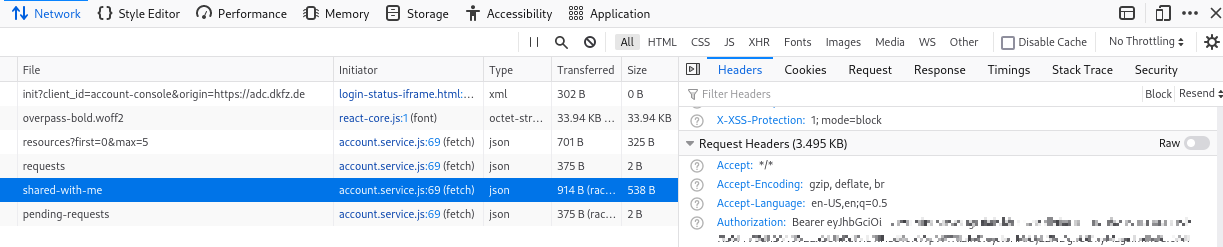
(copy and paste the Authorization header value from the developer tools F12 )
Step 2: Get permission ticket The Content-Protected header triggers emmission of the ticket
curl --location --request GET https://adc.dkfz.de/airr/v1/repertoire/omega_w02_2sr1_1 -H "Content-Protected: true" --head
Step 3: Get RPT token
curl --location --request POST 'https://adc.dkfz.de/auth/realms/realm-ADC-prod/protocol/openid-connect/token' \
--header 'Content-Type: application/x-www-form-urlencoded' \
--header 'Authorization: Bearer eyJhjwdg1234...' \
--data-urlencode 'grant_type=urn:ietf:params:oauth:grant-type:uma-ticket' \
--data-urlencode 'ticket=eyJhbkndj1234' \ | jq
Step 4: Use RPT token to access data
curl --location --request \
GET 'https://adc.dkfz.de/airr/v1/repertoire/omega_w02_2sr1_1' \
-H 'Authorization: Bearer eyJhbGciOjjeicbjs1234...' \
-H "Content-Protected: true" | jq
Access with Postman
Inesctec has provided a collection of postman requests with predefined variables that can be used to access the protected api, import the collection from here:
Postman collection
Step 1 can be included in step 3 (with inbuilt postman browser); postman can manage access tokens.
- Step 1 - Get permission ticket
- Step 2 - Get RPT token (organize access token first, if not available or expired)
- Step 3 - Get protected data
Step 1: Permission Ticket
Add a set of environment variables. In the Tests tab add line pm.environment.set("ticket", ticket);
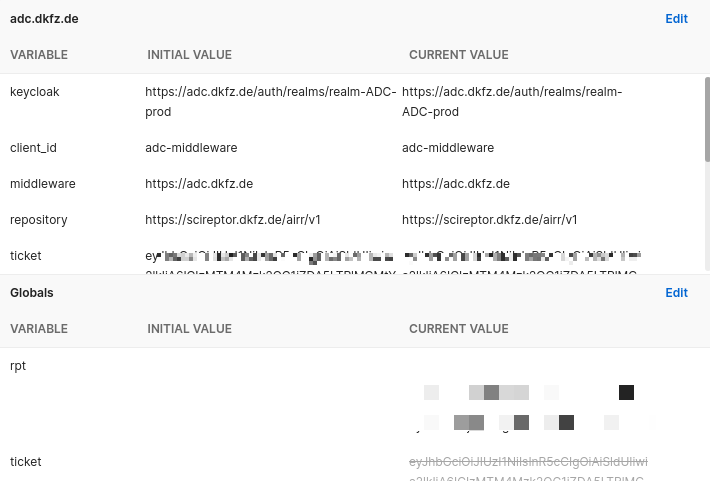
(configure the environment variables for your requests, not all variables seen here are required or available to the user)
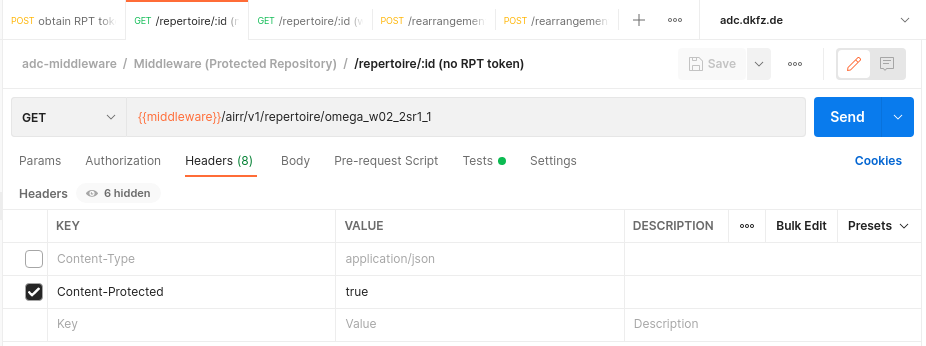
(set Content-Protected header to true)
Step 2: Request Authorization token (2a) and with that request the RPT token (2b)
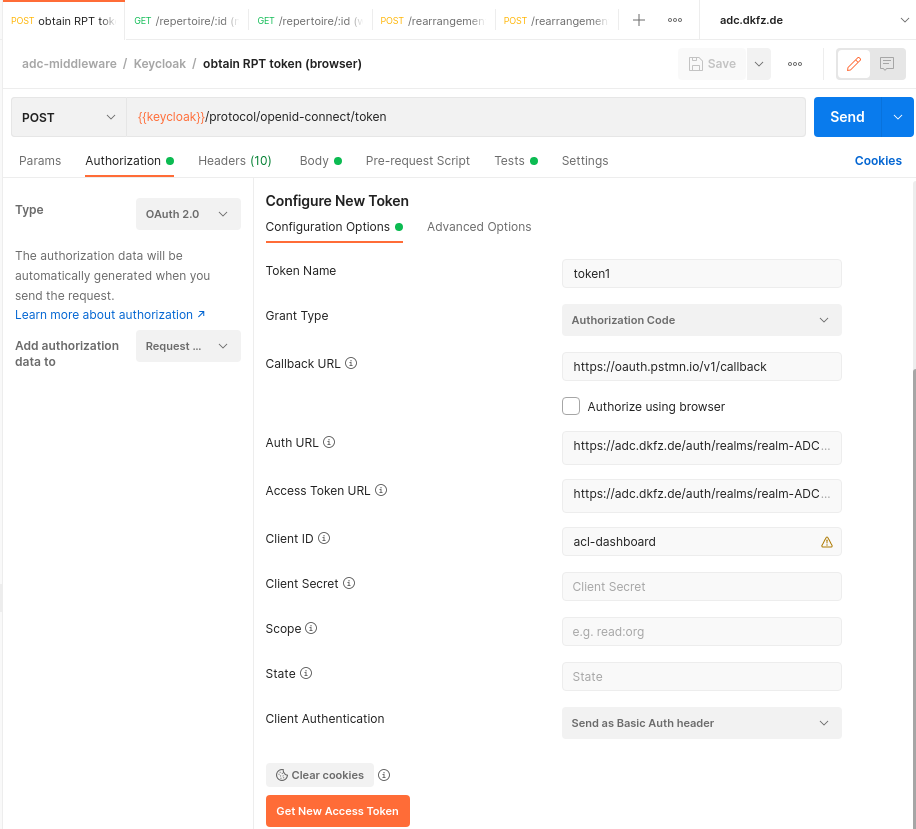
(configure Authorization parameters to get the access token)
| Callback URL | https://oauth.pstmn.io/v1/callback | |
| Auth URL | https://adc.dkfz.de/auth/realms/realm-ADC-prod/protocol/openid-connect/auth | |
| Acces Token URL | https://adc.dkfz.de/auth/realms/realm-ADC-prod/protocol/openid-connect/token |
In keycloak, for the used client id in the request, the callback URL must be added as a Valid Redirect URL! When you request the access token for a helmholtz AAI account, select that flow in the form and authenticate to your organisation, postman will then retrieve the access token from the callback URL. The permission ticket from Step 1 is added to the body of the request. When you have sent the post request with a valid access token and permission ticket, (both expire by time) the RPT token will be stored as RPT variable (see Test tab in Postman).
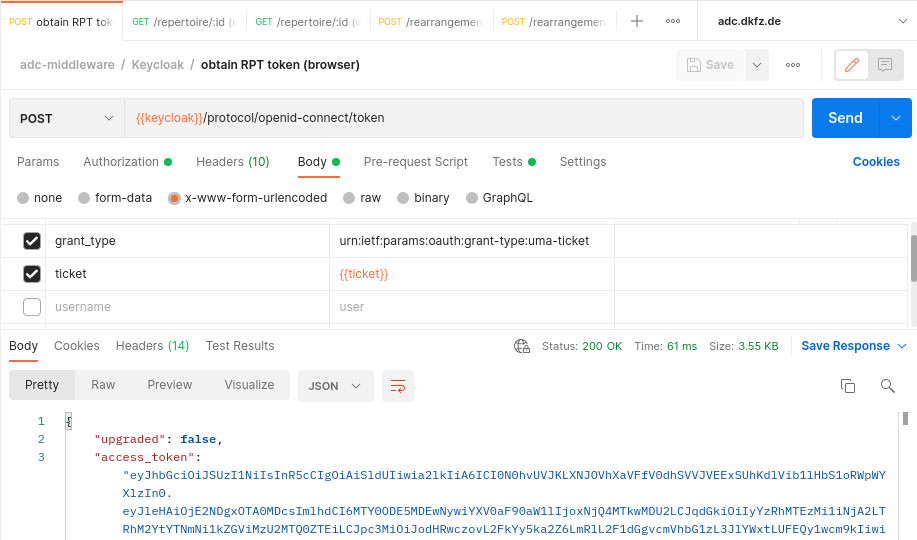
(In Step 2b request the RPT token)
Step 3: Access data
Access to the data is limited to the resource and scope contained in the permission ticket.
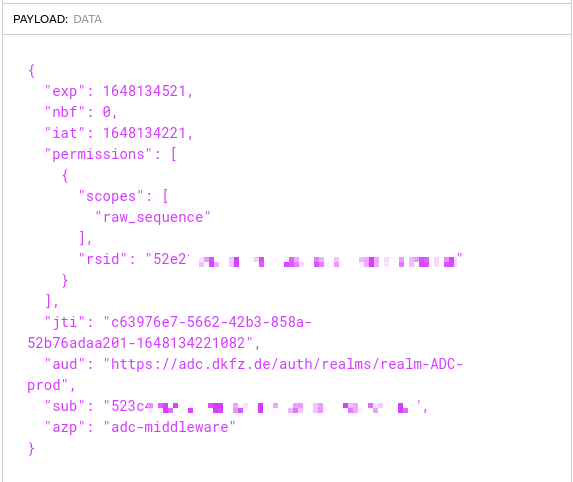
(content of the permission ticket)
With the RPT token recieved, its now possible to access the protected data, in this example a single repertoire.
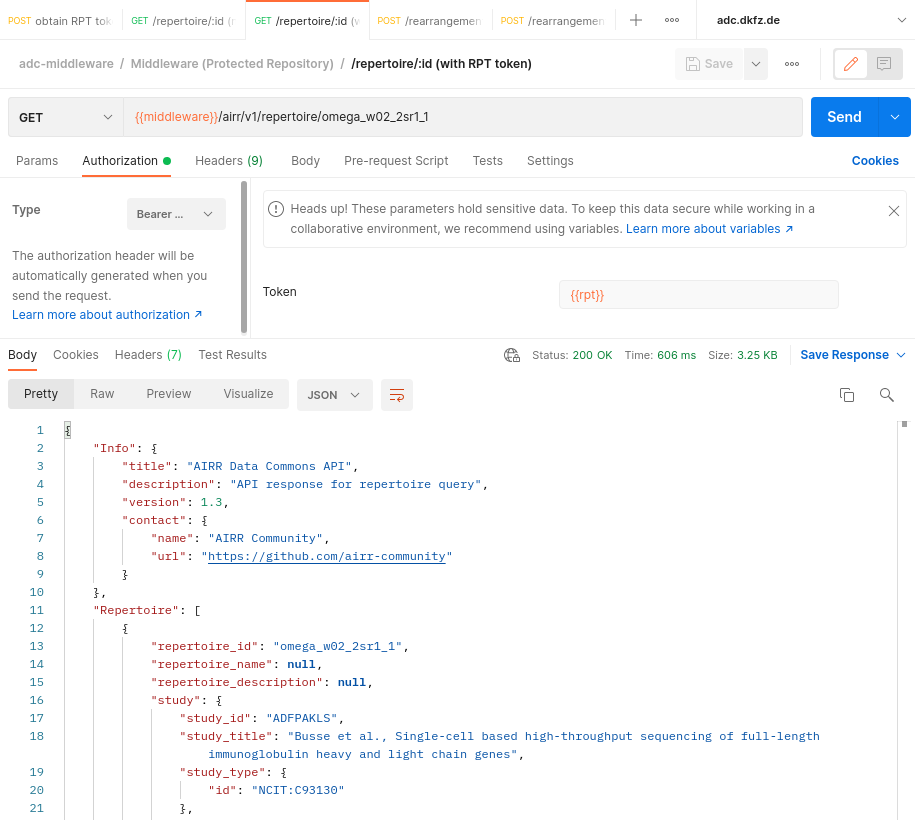
(access protected data with RPT topken from previous step)
In Postman you can save the response containing the requested data.
Further information can be found here:
- iReceptor Plus project - https://www.ireceptor-plus.com/
- ADC v1 API documentation - https://docs.airr-community.org/en/stable/api/adc_api.html
- iReceptor Turnkey on github - https://github.com/sfu-ireceptor/turnkey-service-php
- Documentation about the adc-middleware security framework - https://ireceptorplus.inesctec.pt/wiki/
- ADC Middleware on github - https://github.com/ireceptorplus-inesctec/adc-middleware
- AIRR-seq repository data elements definitions - https://gateway.ireceptor.org/fields-definitions